
How to Choose the Best News WordPress Themes: An Expert-Backed Guide
Why Choosing the Right News WordPress Theme Matters
A WordPress theme builds your news website's identity and sets how it works. News themes need to do more than regular blog themes. They must handle complex content, frequent updates, and different types of media well.
Your choice of theme shapes how well your site performs. WordPress now runs more than 40% of the web. This makes it a huge force in shaping how people experience the internet. Your theme affects not just looks but also the technical stuff that leads to success.
Site speed tops the list of priorities. Studies show that 88.5% of visitors leave websites that load slowly. This matters even more for news sites where quick information delivery is crucial. Themes loaded with too many features, scripts, and stylesheets slow down page loading. You risk losing readers before they see any content.
Mobile-friendly design isn't optional anymore. Mobile devices generate about 55% of all internet traffic. The world has 4.32 billion active mobile internet users. A theme that doesn't work well on phones could cost you half your potential readers - that's bad news for any publication.
WordPress themes also affect your SEO results. Google handles 93% of global traffic. Your theme's code quality, structure, and speed all help determine search rankings. WordPress sites have improved load times by 8% at scale - this is a big deal as it means that the overall web improved by just 5.5%. The right theme helps your news site rank better in search results.
Your theme choice determines:
User Navigation Experience: Poor navigation drives away 61.5% of visitors. You need menus and content that make sense.
Content Presentation: News themes should highlight headlines, images, and breaking stories to keep readers interested.
Customization Capabilities: News teams need to change homepage layouts based on events and content.
Monetization Options: Good news WordPress themes come with ad placement and money-making features.
Security needs attention too. A 2020 study found WordPress powered 74% of 8,000 infected websites. You can reduce these risks by picking themes from trusted developers who update regularly.
Your theme must line up with your news outlet's goals. Different sites serve different purposes - from big papers like The Sun to community news like Veckorevyn. Each needs its own mix of features and layouts.
Look at both current and future needs when picking a theme. Your final choice depends on your budget, technical skills, content focus, and needed features. Publishers who want lots of customization should look for themes with many layout options. Those who value simplicity might prefer more accessible interfaces.
Your WordPress theme choice affects everything about your news site's success - from user experience to search visibility. A careful decision based on your specific needs will create strong foundations for growth and reader engagement.
Key Features to Look for in a News Theme
Choosing a WordPress theme for your news website requires careful evaluation of key features that shape both user experience and backend management. My experience with news sites over the last several years has revealed five crucial elements that set outstanding news themes apart from average ones.
Mobile responsiveness
A responsive news theme adapts to different screen sizes automatically. Your content maintains its professional look on smartphones, tablets, and desktops. This feature has become essential as mobile internet usage now dominates global traffic. Good responsive themes adjust images, text, and navigation elements proportionally on all devices.
Premium themes like Streamline offer adaptive responsive images that work best for various screen resolutions. Themes like MH Magazine and Newspaper use responsive design through W3C and CSS3 media queries. Premium themes add touch gestures that make navigation accessible - a valuable addition for news sites where readers browse multiple articles.
Fast loading speed
Load times are linked to reader retention on news sites where quick access to information matters most. The best WordPress news themes put performance first. Astra, to cite an instance, uses less than 50KB of resources and loads in under 0.5 seconds on clean installations.
Speed evaluation should focus on:
Lightweight coding and compressed files
Vanilla JavaScript implementation rather than jQuery
Core Web Vitals compatibility
Image optimization support
Premium themes like Newspaper include speed boosters built for news websites. Speed test scores can vary, so check a theme's CSS, JS, and font sizes in the GTmetrix Waterfall chart for reliable measurement.
SEO optimization
News websites need strong search visibility to compete for reader attention. Quality news themes come with built-in SEO features that boost your site's search engine rankings. These features include Schema.org markup, which helps search engines read your content structure and show rich snippets for articles and reviews.
ColorMag and JNews themes provide SEO features ready to use with minimal setup. Google-friendly themes have clean HTML code structures. Newspaper, the top-selling news theme today, includes complete SEO elements made for news content.
Custom widgets and layout options
News sites need flexibility to handle breaking stories and shifting priorities. The best news themes give you drag-and-drop builders made for news layouts.
TagDiv Composer, which comes with themes like Newspaper, offers news-specific elements for quick layout changes. MH Magazine uses WordPress Customizer integration so you can see changes before they go live. Modern customization options now include:
Category-specific color coding that organizes content better
Fullscreen slideshow support for multimedia stories
Custom post types and taxonomies for specialized content
Widget-based designs that manage extensive content
Ad placement and monetization support
News websites need reliable revenue streams, so smart ad placement options are vital. Quality news themes include dedicated ad spots throughout the template that maximize visibility without hurting user experience.
Newspaper theme works with responsive Google Ads, AdSense, and banner advertisements. Its placement options keep readers engaged. SmartMag offers responsive AdSense units that fit any screen size or orientation. Advanced themes feature:
Pre-configured spaces for standard ad sizes (728×90 and 300×250)
In-article ad spots that drive engagement
Custom ad systems for both programmatic and direct-sold inventory
These five key features will help you pick news themes that look professional and support your publication's growth, content strategy, and revenue goals.
Types of News WordPress Themes
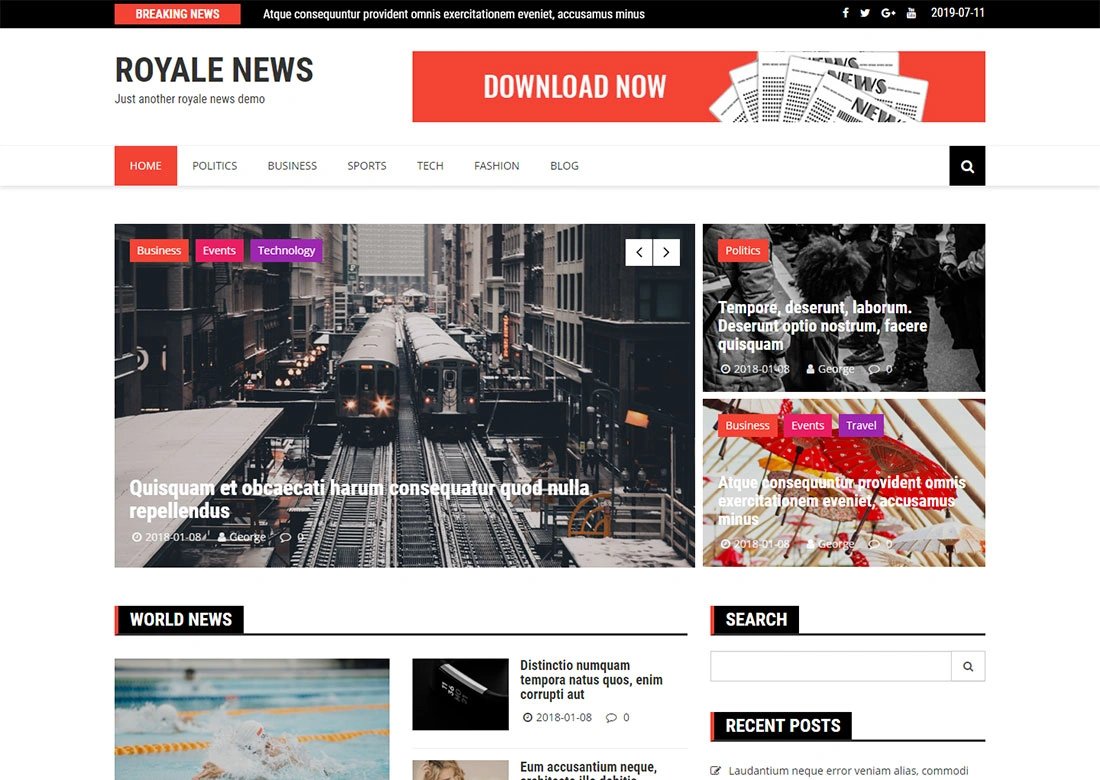
Image Source: Colorlib
WordPress news themes come in many styles that match different publication needs. You'll find everything from classic newspapers to modern magazines. Each type has its own layouts and features that work best for specific content styles.
Traditional newspaper layout themes
These themes copy the familiar grid layout you see in print newspapers. They use headline-heavy designs with multiple columns that show content by importance. Classic Newspaper is a WordPress theme that works well for news websites, magazines, publishers, and blogs. You can customize content easily with its widget-based design while keeping good SEO rankings.
Public Opinion is a standout theme built just for newspapers. It's easy to set up and manage. Every feature focuses on news and editorial content, unlike general-purpose themes. The theme has dedicated ad spots, mega menu support, and ways to help readers find content.
The popular Newspaper theme (which claims to be the best-selling news theme ever) gives you a classic newspaper feel with modern features. You get breaking news tickers, featured post sliders, and support for videos, audio, and gallery posts.
Magazine-style themes
Magazine WordPress themes give you more visual options than newspaper layouts. They use bigger images and creative ways to show content. Sydney gives you 28+ professional starter websites, with designs made for magazine-style publications. Creating a custom magazine look is simple with its many layout options and pre-built sections.
MH Magazine has a clean design with flexible layouts and more than 26 widget spots, including a front page you can fill with widgets. Magazine publishers can create flexible layouts and prominent ad sections with these options.
Themes like Look and 15Zine have clean, simple designs that work great for fashion newspapers, magazines and blogs. They use masonry grid layouts and better typography choices to balance visual content with text articles.
Minimalist content-first themes
These themes put reading and content delivery first, ahead of fancy design elements. Minimalio is a clean WordPress theme that news publishers use when they want a simple, focused layout. You'll see lots of white space, few distractions, and designs that highlight typography.
Pixwell stands out as a magazine news theme that loads fast and ranks well. It has dark mode and works great on mobile devices. Patch uses a masonry-style layout that makes your content stand out while keeping things simple.
These themes skip crowded sidebars and unnecessary animations. Readers can focus on your content. This works well for long-form journalism or publications that care most about the reading experience.
Drag-and-drop builder themes
Builder themes let you customize layouts without knowing code. SeedProd makes it easy for beginners to build websites and landing pages on WordPress. You can build everything from headers to post templates using simple drag-and-drop tools.
Divi works as both a theme and visual builder. You can create any kind of newspaper or magazine site and see changes as you make them. The drag-and-drop editor helps you make unique layouts without extra plugins.
The Newspaper theme comes with tagDiv Composer page builder. You can create and customize blogs, news sites, magazines, shops, and business websites quickly. Newsreader uses Elementor page builder and gives publishers seven ready-to-use demos.
Publishers who often change layouts or want custom designs without hiring developers love these builder themes.
Free vs Premium News WordPress Themes

Image Source: Pagepro
News website creators face a big choice between free and premium WordPress themes. WordPress offers more than 30,000 free themes, and learning what each option provides helps you make the right choice that matches your publication's goals.
What you get with free themes
Free WordPress themes give you several advantages beyond not costing anything. These themes work great for beginners and small publications with tight budgets. WordPress.org reviews most free themes to make sure they meet simple quality and security standards. This review process helps you feel more confident about your choice.
These themes are easy to install. You can browse and add them right from your WordPress dashboard without much technical knowledge. Many free themes use WordPress's standard theme customizer, which creates a familiar space to make simple changes to your site's look.
Popular free options like ColorMag have more than 50,000 active installations. These themes usually come with:
Responsive design that works across devices
Basic layout options for homepage configuration
Category color settings for content differentiation
Simple ad space integration for basic monetization
In spite of that, free themes have their limits. You get fewer features and customization options, which might hold you back from creating a unique news site. You'll have to rely on community forums instead of dedicated support, and updates might not come regularly.
When to think about premium options
Premium themes make sense when your news website needs advanced features and ongoing support. Business-critical websites can't afford downtime, and premium themes' dedicated support is a vital part of preventing it. You get ticketing systems, live chat, and service-level agreements.
Premium WordPress themes pack more features and customization options. They include multiple layout choices, pre-built templates, and unlimited color schemes. These themes often have built-in drag-and-drop builders, eCommerce optimizations, and dynamic content integrations, so you need fewer third-party plugins.
Premium themes also get updated more often than free ones, staying compatible with the latest WordPress version and popular plugins. Regular updates help protect your site from security issues and technical problems.
Cost vs value comparison
Premium news WordPress themes cost between USD 50.00 and USD 200.00+ upfront. This might seem like a lot at first, but you should look at the long-term value. Premium themes often come with developer-friendly licenses, and agencies might benefit from extended licenses that don't charge per project.
Free themes might end up costing more in terms of time. You could spend many hours trying to build a website that works the way you want. Sometimes, you might need to hire professionals to work around free theme limitations, which could cost more than buying a premium theme.
Your news site's specific needs play a big role in the value equation. Free themes work well for personal blogs, small community news sites, and publications that don't plan to make money. Sites that need unique designs, lots of customization, or e-commerce features do better with premium options.
A theme's real value comes from how well it matches your publication's goals, technical needs, and growth plans. Both free and premium options can deliver great results when you choose based on what you need.
Top Use Cases and Matching Themes

Image Source: Themewinter
You need to match your publication's needs with the right theme capabilities to find the perfect news WordPress theme. Your expertise level, publication size, content type, and target audience will determine which themes work best for you.
Best for beginners
New website creators will benefit from easy-to-use themes that don't take long to learn. Sydney shines as a great choice for beginners with its front-page blocks that work like building blocks. You can create layouts by dragging and dropping widgets without any coding knowledge.
Astra and Neve do great with their mobile-first approach and real-time customizers. These themes work smoothly with page builders like Elementor, so beginners can create professional designs without technical hassles.
ColorMag is one of the most popular free newspaper themes that's easy to use. It's perfect for newcomers who want a classic magazine layout with lots of custom widgets. With more than 50,000 active installations, you'll find plenty of community support and tutorials.
Best for large publications
News organizations need strong, feature-packed themes that can handle lots of content. Newspaper, which claims to be the "#1 selling news theme of all time" with over 135,000 customers, comes with 155+ prebuilt websites and complete WooCommerce integration for those looking to monetize.
SmartMag has been a favorite for content-heavy websites for years because it lets you create almost any type of news site. Major publications with different content categories find it very versatile.
Divi works as both a theme and visual builder, giving large publications complete design freedom with real-time editing. Editorial teams can create custom layouts that grow with their content needs using this powerful framework.
Best for multimedia-heavy sites
Visual storytelling needs themes that work well with images, videos, and interactive content. Inspiro is a premium, media-focused WordPress theme built for bloggers and creators who use lots of visuals, photos, videos, or design content.
Zeen gives you more than 30 professional-looking website templates with lots of variety in look and layout. Sites with lots of multimedia content work well with its flexible design approach.
Tracks is a bold, minimalist WordPress theme with a dark, clean layout and large featured images. It shows off both text and visual content beautifully. The design makes an impact while keeping everything readable.
Best for local news blogs
Community news sites need themes that look professional while keeping local charm. The Local News theme turns websites into professional news portals with just the right mix of features for aspiring news sites. Community-focused publications will find its custom-made system meets their needs.
Digital Newspaper has won over 5,000 WordPress news website owners. Its professional 3-column main banner design works great for local news sites. You get 7 front sections with different news block layouts to cover your community stories.
PubNews is a great all-purpose theme that works with both customizer-based editing and Elementor builder. Local news blogs can create their own unique look while staying professional, even without much technical know-how.
Whatever type of publication you run, picking a theme that fits your specific needs will help your news site work well for both you and your readers.
How to Evaluate a Theme Before Installing
A full review of WordPress themes before installation will save you countless hours of troubleshooting and prevent potential site crashes. My experience with news websites has helped me develop a practical approach to theme assessment that protects site functionality and gives optimal performance.
Check demo and layout options
Start by creating a checklist of features you want from the theme to review each option step by step. Your checklist should cover suitability for specific website types (charity, e-commerce, news), setup simplicity, and customization options. Take a close look at the theme's demo site to make sure it aligns with your brand identity and user experience expectations.
The demo review should focus on logo placement, typography options, and color scheme flexibility. A working demo site proves successful installation and expected appearance. You can spot potential implementation issues quickly by comparing your installation with the theme's demo.
Test mobile and speed performance
Mobile responsiveness is vital for news themes. You can test responsiveness on your actual mobile device or by resizing your browser window to check if the layout adapts properly. Adaptive themes should keep text readable and navigation working on all screen sizes.
Google PageSpeed tools are a great way to get performance metrics for both desktop and mobile devices. Loading speed directly affects user experience and search rankings. News websites cannot compromise on this evaluation step because they need to deliver timely information.
Review plugin compatibility
Plugin compatibility is one of the most overlooked parts of theme evaluation. Incompatible plugins can:
Cause conflicts with page builders and content libraries
Crash your website with multiple errors
Create security vulnerabilities if not consistently updated
Result in support limitations for troubleshooting
Set up a separate testing environment for compatibility testing. Deactivate all plugins, then reactivate them one by one while checking the frontend appearance. This method helps you identify which plugin might conflict with your chosen theme.
Look at user reviews and support
Read what other users say about their experience with the theme before installation. Their feedback often reveals problems you might face. Check the theme's update frequency and support history. Themes updated within the last three WordPress releases usually offer better security and functionality.
Documentation and changelog explain how well developers maintain a theme. Well-documented themes make configuration easier and reduce setup errors. Support response time is another key factor. Premium themes come with dedicated support channels that help solve technical issues quickly.
This systematic approach to evaluating these four aspects has helped me avoid common pitfalls that many publishers face. Your news site will stay stable, run efficiently, and give readers the best experience possible.
Common Mistakes to Avoid When Choosing a Theme
Picking a news WordPress theme requires careful thought to save you time, money, and headaches down the road. Site owners tend to zero in on certain features while missing other key factors that shape their site's success.
Ignoring performance standards
Your site's performance shapes user experience and search rankings. Latest standard data reveals WordPress 6.2 loads 14-18% faster for block themes and 2-5% faster for classic themes. Server-side performance improves by 17-23% for block themes, which helps reduce overall load time.
Beautiful news themes often pack too many animations, heavy code, and extra scripts that slow your site. Tools like Google PageSpeed Insights or GTmetrix help test a theme's speed before you commit. Note that you can "cache" away server problems, but client-side speed issues stick around.
Choosing based on looks alone
News sites need to look good, but picking a theme just for its appearance ranks among the biggest mistakes. A theme might look amazing yet lack speed optimization, SEO features, or core functions. The best approach finds themes that mix great design with practical features:
Speed and responsiveness across devices
Built-in SEO optimization features
Customization options that meet your specific needs
Clean, well-laid-out code underneath the design
Expert developers say themes that look great but lack function or run slowly will hold back your website.
Overlooking update and support history
Themes that developers abandon or rarely update put your website's security and function at risk. Check the theme's last update date and WordPress version compatibility before you decide. The developer's support track record matters just as much.
Old themes might have security holes that hackers love to exploit. They also tend to clash with newer WordPress versions or popular plugins. Regular updates bring crucial bug fixes, security patches, and speed improvements.
These abandoned themes miss out on WordPress's new features that come with major releases. A close look at how often a theme gets updates and what support options exist helps protect your news site from future technical issues.
Recommended Tools and Plugins to Pair with Your Theme
A great WordPress news theme needs the right plugins to reach its full potential. The right tools paired with your theme will create a more powerful publishing platform that works better.
SEO plugins
Your news site needs dedicated SEO plugins to rank well in search engines. Rank Math SEO provides automated recommendations, rich snippet support for news articles, and naturally connects with Google Search Console. News publishers can use CrawlWP to notify search engines right away when new posts go live through Google Search Console integration and the IndexNow protocol. The plugin tracks index status to make sure your breaking news shows up quickly in search results.
Caching and performance tools
News websites must be fast. WP Rocket is a premium caching solution that offers lazy loading, minification, and GZIP compression to make your site load faster. W3 Total Cache gives you free caching options like page cache, minification, browser cache, and lazy load images. These tools cut server load during traffic spikes and make the site better for users when set up properly.
Newsletter and lead capture plugins
An email list helps you keep readers coming back. MailPoet lets you create automatic emails and newsletters with subscription forms that tell readers about your latest news. You can have up to 1,000 subscribers on the free plan. The Newsletter plugin gives you unlimited subscribers, double opt-in features, GDPR compliance, and detailed stats. Both tools work naturally with news themes to help grow your audience.
Social sharing tools
Good social sharing helps more people see your content. WPZOOM Social Icons & Share Buttons comes with native Gutenberg blocks and AI sharing buttons for platforms like ChatGPT and Claude along with regular networks. Sites with international readers can use AddToAny which has a universal share button that shows over 100 sharing options from major platforms to niche networks. Sassy Social Share gives you many visual customization choices with AI sharing features.
These tools combined with your news WordPress theme create a detailed publishing platform that connects well with readers.
Conclusion
The success of your news website depends on picking the right WordPress theme. This piece covers everything you need to know about making this important choice. Without doubt, a successful news platform needs mobile responsiveness, fast loading speed, and SEO optimization as its foundation.
Your theme choice should line up with what you want to achieve and what your readers need. WordPress gives you plenty of options - from traditional newspaper layouts to magazine styles, minimalist designs, or drag-and-drop flexibility that matches your vision.
Beginners and small publications with simple needs can do well with free themes. But premium themes come with more complete features, better support, and regular updates that make them worth the cost for serious news operations.
Take time to get the full picture before you decide. Check demos, test performance, look at plugin compatibility, and read what other users say. This helps you avoid focusing too much on looks over function or missing red flags in support history.
We suggest adding tools like SEO plugins, caching solutions, newsletter features, and social sharing options to your theme. These additions improve your theme's basic functions and create a powerful platform to publish news.
WordPress leads the digital world because it's versatile and has a resilient ecosystem. Your news site needs a theme that combines great looks with technical excellence. The right choice gives you the ability to share content well and build a lasting online presence.
Key Takeaways
Selecting the right WordPress news theme is a strategic decision that impacts every aspect of your publication's performance, from user experience to revenue potential.
• Prioritize performance over esthetics - Choose themes with fast loading speeds (under 0.5 seconds), mobile responsiveness, and clean code structure to retain readers and improve SEO rankings.
• Match theme type to your publication goals - Traditional newspaper layouts work for classic news sites, magazine styles suit visual content, minimalist themes benefit long-form journalism, and drag-and-drop builders offer maximum customization flexibility.
• Evaluate thoroughly before installing - Test demos, check mobile performance, verify plugin compatibility, and review update history to avoid costly mistakes and site crashes.
• Consider premium themes for serious publications - While free themes work for beginners, premium options provide dedicated support, regular updates, advanced features, and better monetization capabilities worth the $50-200 investment.
• Enhance with complementary plugins - Pair your theme with SEO tools (Rank Math), caching solutions (WP Rocket), newsletter plugins (MailPoet), and social sharing features to create a comprehensive publishing platform.
The right WordPress news theme serves as your publication's foundation, balancing visual appeal with technical excellence to deliver content effectively while building sustainable online growth.
FAQs
Q1. What are the most important features to look for in a WordPress news theme? The key features to prioritize are mobile responsiveness, fast loading speed, SEO optimization, custom layout options, and ad placement support. These ensure your site performs well across devices, loads quickly, ranks in search results, allows customization, and enables monetization.
Q2. How do free and premium WordPress news themes compare? Free themes offer basic functionality and are good for beginners, while premium themes typically provide more advanced features, customization options, dedicated support, and regular updates. Premium themes usually cost $50-$200 but can offer better long-term value for serious publications.
Q3. What types of WordPress news themes are available? The main types include traditional newspaper layouts, magazine-style themes, minimalist content-first designs, and drag-and-drop builder themes. Each type caters to different content presentation styles and customization needs.
Q4. How can I evaluate a WordPress theme before installing it? To evaluate a theme, check its demo and layout options, test mobile responsiveness and loading speed, review plugin compatibility, and examine user reviews and support history. This helps ensure the theme meets your needs and avoids potential issues.
Q5. What common mistakes should I avoid when choosing a WordPress news theme? Common mistakes include ignoring performance benchmarks, choosing based on looks alone, and overlooking update and support history. It's crucial to consider both esthetics and functionality, as well as long-term maintenance and compatibility.
This is a blog post. No installation required.
Frequently Asked Questions
Q: Is this file safe?
A: Yes, we scan every file with Norton & VirusTotal before sharing. It is 100% clean.
Q: Is this the latest version?
A: We try our best to update files as soon as a new version is released.
Q: Is it legal?
A: Yes, all themes and plugins released under the GPL (General Public License) are free to distribute.
Discussion
You must be logged in to post a comment.
Login to CommentNo comments yet.